|

After getting the extension number and an account
information through the email. You have to download a SIP
client on the PC to receive calls
Guild is to install and configure X-Lite (the most
commonly used SIP client)
- Installation of X-Lite
- Setting Up X-Lite
Installation of X-Lite
- Download
X-Lite
- Install the client and run in
- Click on drop down menu and select "Sip Account
Settings"
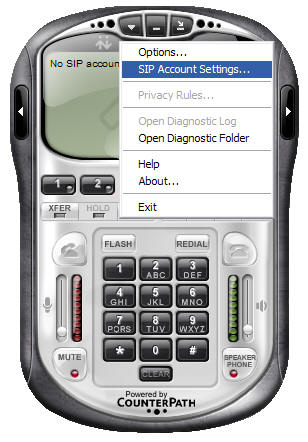
- Click the "Add"
button

- Create an account under "Account" tab

"Account" tab
Display Name = <enter own name>
User name = <enter 4 digit extension> ex. 4098
Password = <password>
Authorization user name = <enter 4 digit extension>
ex. 4098
Domain = sip.wacky.mooo.com
Enable "Register with domain ......"
Set "target domain"
-
Setting up firewall setting
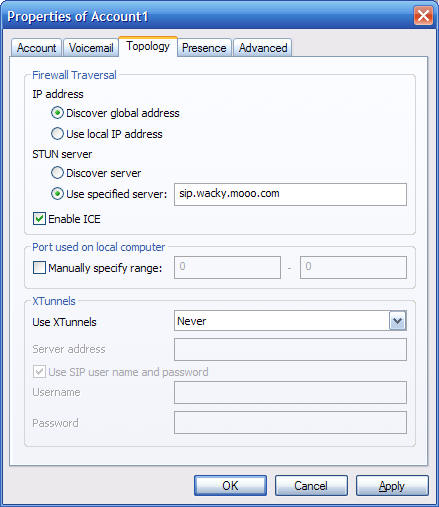
IP address
Set "Discover global address"
STUN server
Set "Use specified server:" sip.wacky.mooo.com
Check Enable ICE
X-Lite is setup is finished
To test to see if the client is setup properly dial 7777
to internal IVR or dial *43 for echo test
If the test goes well try one of the PSTN access numbers
and see if it works
|